
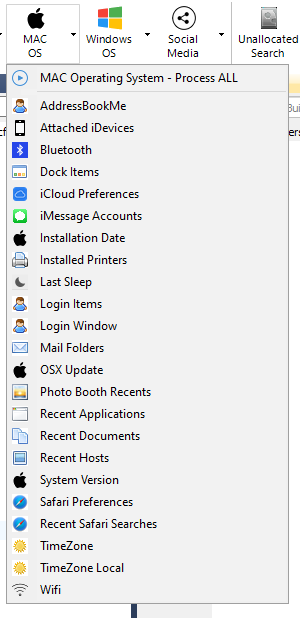
 Mac Artefacts Menu
So that's a reasonable amount of artefacts (23) - however, don't expect to carry out a full investigation of an Apple machine using these artefacts alone as OSX has a lot more juicy things available. I didn't see (or expect to) any support for Apples unified logs (read about those here if interested).
Any thoughts on adding support for unified logs GD ?
As this is not a dedicated Apple forensics tool, this is at least going to answer some of the common questions an investigator may have about a machine. So lets manage our expectations a little here, I am not expecting BlackLight or Recon Lab levels of performance.
So running a bog standard Encase .E01 image of a 2009 iMac, which was running the fairly recent High Sierra (10.13) we get this (click to enlarge);
 OSX 10.13 - High Sierra - Recovered Artefacts
What Just Happened ?
I'm not too sure what is going on here (my wooden testing stick is quivering feverishly....) - as we seem to have far less than what I would expect in the way of successfully parsed artefacts.
I know this particular machine has;
a. Apple Mail set up with an active account and data files.
b. iCloud set up with an active account.
c. The time zone is set to London/Europe
All are Artefacts that FE has menu options for (go back two screen shots to the Mac Artefacts Menu).
So FE totally drops the ball here, lets investigate further and see where the root of the problem lies, perhaps I am expecting too much - missing is better than inaccurate I suppose ?!
Lets Try an Older Version of OSX!
So lets try another Mac image, I have plenty - that I know inside an out as to what exists and what doesn't, so lets try something a little older as perhaps these scripts are out of date and don't work with the newer Apple operating systems...
Next up is OSX 10.8,
 OSX 10.8 - Recovered Artefacts
Ok, so that worked slightly better we have a decent number of artefact categories recovered 12 out of a possible 22, look mum - lucky me, we have the timezone on this one!
What we can also see here (above) is that FE is not consistent when showing artefacts that have no data.
In some cases it does not show the category (my preferred way - less clutter) and in other cases it does show the category - even when there is no data to be displayed - and marks it with a 0.
This is something that FE suffers with - inconsistencies in the way information is shown to the examiner, to me it looks like there are different programmers responsible for different parts of the code - and they don't share a common design specification.
I will touch on that again in other sections of the review, so lets hope GD take note.
Quick Quiz: Who knows off the top of there head (without Googling) the friendly name of OSX 10.8 is? (Jason and Steve you can't enter this - Macvellian's are excluded from entry). This reviews prize is a full set of 24 carat gold plated Norton Utilities V2.0 3.5" floppy disks, which you can use on your next investigation. The whole disk is not gold, just the shutter. First answer via the CFRO contact page wins, entry terms and conditions at the end of the review.
Ok, so lets go forward in time "Warp Speed a Donald Trump would say" to the newest version of OSX (Catalina) and see how we get on....
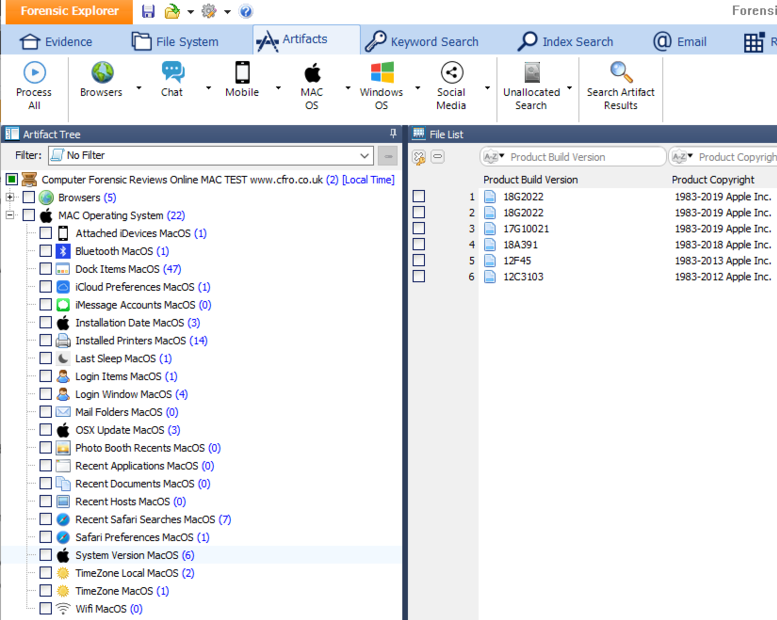 Mac Artefacts - Click to enlarge
As you can see, FE has rather annoyingly lumped all of the artefacts together, so instead of having a hierarchy on the left hand pane allowing me to view the artefact tree on a "per disk image" manner, I have to sift through all the artefacts in each folder shown in the right hand window. This is confusing with just the 2 disk images that are in this case, what if I had 20 ????
I'm sure I can filter these results - but I'm not a fan of this design, its messy and offers no compartmentalisation and I can't quickly see what worked and what didn't.
The eagle eyed of you may have noticed that there are 6 items in the "System Build" category above, what we have here is FE blindly wandering off looking inside other files - extracting any the build date information (poetically from Recon Imager & Lab in this instance - they were in the test disk image) and putting that in the artefact section reserved for the Operating System version.
So after creating a new case, reparsing the Catalina 10.15 disk image, on its own we can see below that FE's report on artefacts for Catalina is as miserable as it was for Mojave - with some of the really important artefacts not even on the list.

Well, that did not go well at all 9 out of a possible 22. Trying to be polite as possible, the Apple Mac Artefact module of FE needs some serious work to make it a usable feature. As I am sure you will agree, its not doing what it is supposed to do.
It is a massive amount of work to keep on top of and to be frank - there are much better tools out there to do Mac forensics with. If I would say anything to GD's decision makers; focus on what this product is good at (Windows) and leave the Mac market to the likes of Sumuri and Blackbag. Or, put the price up and invest more development resources in keeping this area up to date. Even the dedicated Mac forensics vendors have issues with parsing - check out this review to see how other Apple artefact parsers also have issues.
Section Summary - Below Average - Would of been Good, but needs a massive overhaul to ensure that examiners don't miss important information when examining contemporary versions of MacOS.
 E-Mail Tab - Click to enlarge
23. Testing - Remote Analysis Module:
How many more things are they going to cram in here (I'm not complaining!).
I kid you not - FE has remote data acqusition capabilities, this is one of the last things that I tested during my review.
Documentation for this function is a little weak in the manual, but if you have used anything like this before (Encase Enterprise or even VNC as examples) you will be right at home.
Servlet Setup:
To connect to a remote machine, that machine will need to run a small applet (program) which as a 12MB footprint and as far as I can see is the only file that needs to be executed on the remote machine
I'm not sure if there are any dependancies (Delphi runtimes as an example) which is something GD could add to the manual for clarity.
Dependancies aside (if any) there is nothing to install on the remote machine, simply have the user plug in a USB stick or CD with the servelet program on and run it. I would assume this requires local Administrator privileges - but don't hold me to that. You can also remotely execute the program by potentially using PSEXEC, to remotely copy the servlet up the wire from your machine and execute it on the suspect machine.
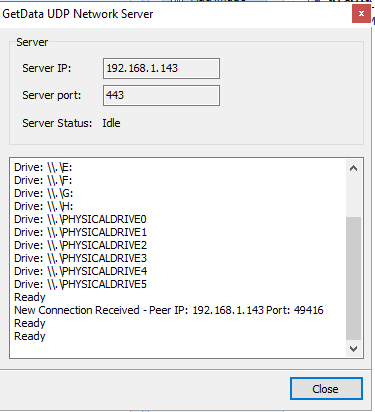
Running the applet shows you the IP address of the suspect machine (which the user can inform you of). You will most likely be prompted to add an exception to the Windows firewall if it is running - but other than that, there is nothing the user at the remote end needs to do.
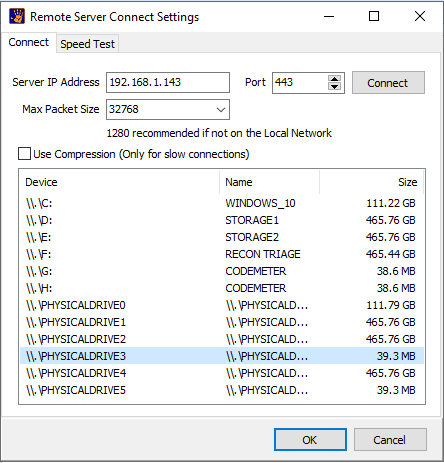
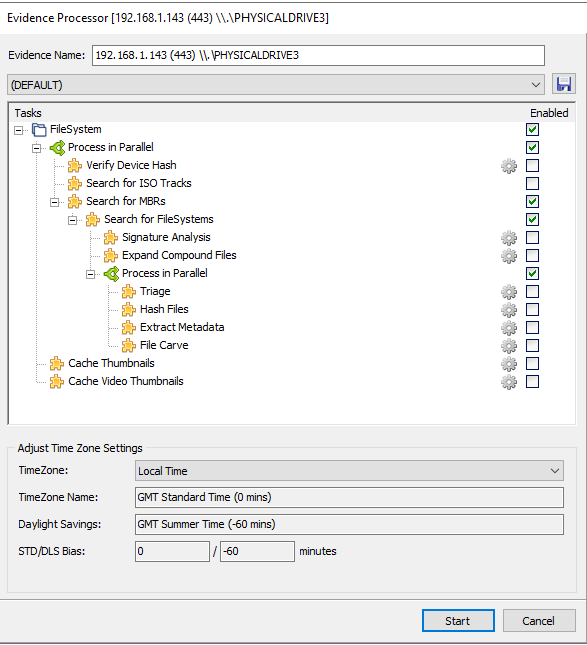
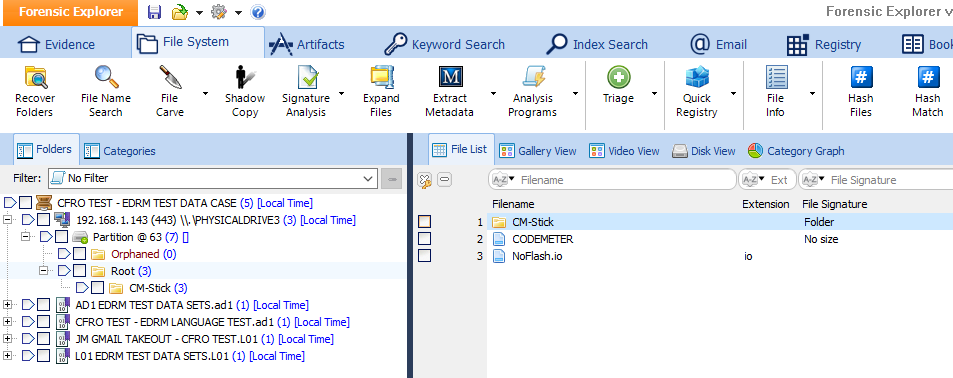
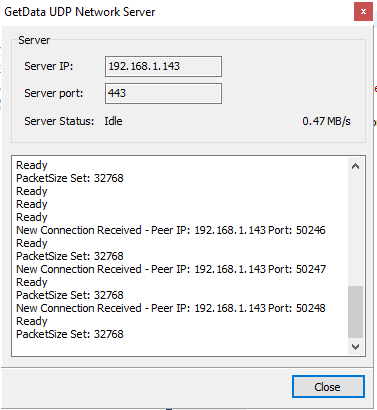
Check out the carosel of screenshots below that walks through how this looks at both ends....
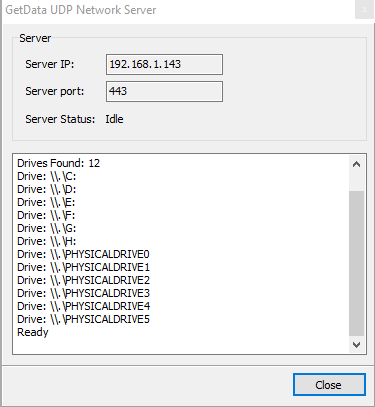
Connecting and Investigating:
On your forensic workstation, head over to the Evidence tab and from here you can add a remote device. Inputting the IP address of the remote machine quickly gets you connected (firewall permitting) and you can add either logical drives or physical disks to FE for analysis.
You can freely browse the file system and run any scripts you want over the data, but my advice is not to do that - pull the files you want to examine to your workstation first, encapsulate into a logical evidence file and examine them locally.
Whilst it may sound amazing and next gen this remote analysis, trust me, connections across the Internet and across corporate LAN's are not fast and prone to interruption - be that by a user, windows updates, IDS or behavioural analysis software running on endpoints.
Think, Plan, Export:
Think logically about what you want to examine and collect things in batches.
Perhaps Email containers first, then Documents, then windows registry and perhaps event logs is a good start. It depends on what is a priority to your investigation.
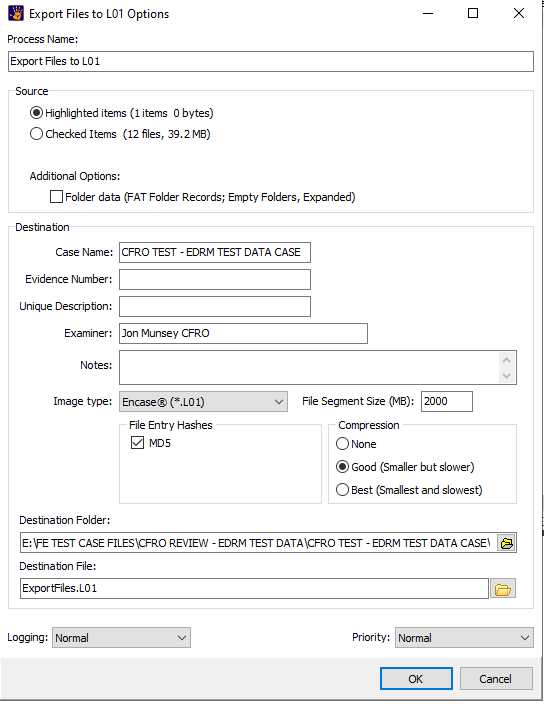
Getting the data (no pun intended) down the wire from the remote machine is as simple as selecting the required files and then right clicking and exporting to a .L01 zip file or raw files.
You can also copy unallocated clusters if you are brave, but I would not recommend that - I did not test the stability of FE's connection for something that big.
You also need to give consideration to factors that may cause the collection to be interrupted - so ensure that things like sleep, hibernation are all switched off for the duration of your connection.
I would like to see a little more detail in the manual to let you know what happens if you are disconnected mid way through running a long scan or parsing script if you do choose to work in this manner.
Collection Speed:
I achieved speeds of 470KB a second during my test, your milage may vary (so it is worth fiddling with the packet size settings to find something that works best with your particular network) but as we are not collecting entire disks, this is a reasonable speed.
On local LAN networks, I would expect to see much higher speeds - the remote module has a speed test built in, so you can test your connection with a click of a button before you start pulling files down the wire.
Make It Killer Feature:
To make this sit right up there with Encase Enterprise and other remote tools, GD need to build in some kind of scheduler, where a series of tasks can be queued (for example - download registries, then link files and then internet history files). That again is something that would actually sell more copies of FE!
Summing Up:
Well I thought this was going to be useless if I am honest, but no, its not something half baked - it does what it says on the tin and from the limited testing I did, performed flawlessly.
With the current pandemic in place, this is now more than ever a killer feature.
Remote Collection Summary: EXCELLENT - Fantastic, does what it says on the tin.
24. Testing - Time Line Feature:
Another feature of FE that I would be using every day (if FE was in my tool set) is the Timeline.
Not sure about you, but nothing beats having the entire users/machine's activity profile in front of you - allowing you to zoom in on dates of interest.
Be warned that FE's timeline is not as comprehensive as you would perhaps expect (when compared to other tools such as Axiom or Kape), so I am not expecting like for like performance parity with other dedicated timeline tools.
 Time Line Diaglogue - As hardcore as ever "$30 Modified"....
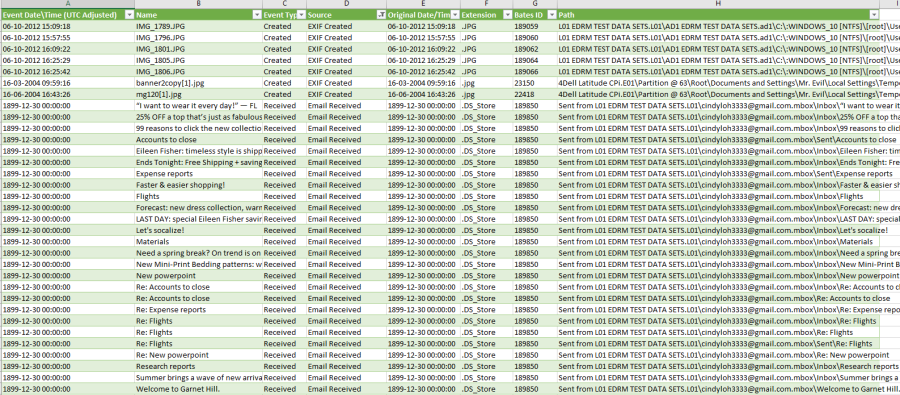 .CSV output of timeline
Good
Know the Limits:
It is important to understand what is NOT included in the timeline, so I would advise you to examine the Time Line dialogue carefully. Using FE's timeline requires the examiner to methodically ensure that everything it added to FE's tabs (File System, Email and Registry) BEFORE attempting to create the timeline - to ensure that as much data is included as possible.
This is all clearly explained to the examiner at the time of creating the timeline, so for most, this won't be an issue.
Great for Mini Timelines:
As FE is not (and is not expected to be) the best timeline creator out there, I would recommend this to be used to create "mini timelines", those where for example you are attempting to show a user received and email, browsed a website and modified a document at a certain time.
You are not going to see anything from the new Windows Timeline function that Windows 10 has, nor are you going to see entries from the SHIM or BAM repositories - those are only going to be found in the dedicated timeline tools.
If you keep your expectations managed when using FE's timeline feature, you won't be dissapointed.
Issues:
I came across some issues using the Time Line feature, we will revist those in the bugs section.
Time Line Section Summary: Average - Would have been Very Good had it not been for various errors in the output .csv files which does not inspire confidence in the output as a whole.
25. Testing - Byte Plot Feature:
If it Looks Like a Duck, Sounds Like a Duck, Then it Probably is a Duck:
A neat feature for the nerds out there is the byte plot feature - this allows you to look at any file and visualise its structure.
The example below is a compressed .CAB file (a Microsoft format usually used to deliver compressed operating system files) - Yellow is the metadata inside the file (for example the list of file names, data runs, offsets, Blue is the actual binary data (the compressed operating system files) and so on.
I don't think this is something that your average investigator is going to use, but its an interesting feature and does have some novel uses - particularly if you are investigating malware or some kind of obfuscation technique used by a threat actor.
As I said, this is not a mainstream feature, but its cool as heck!
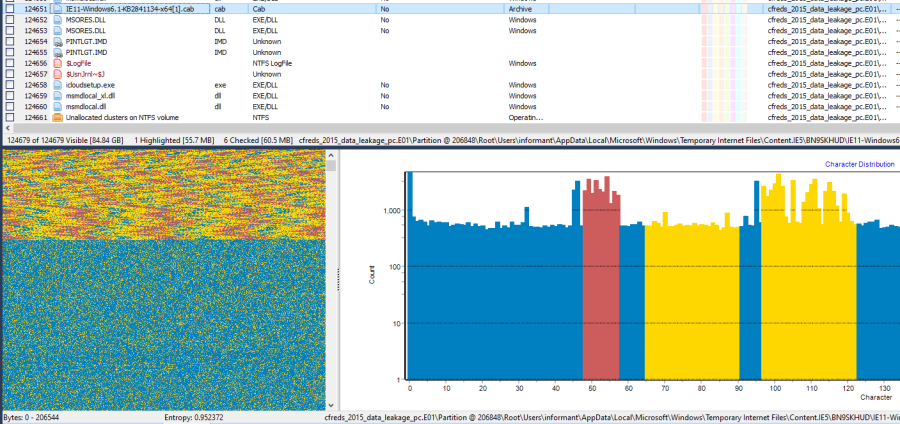 Byte Plot Feature
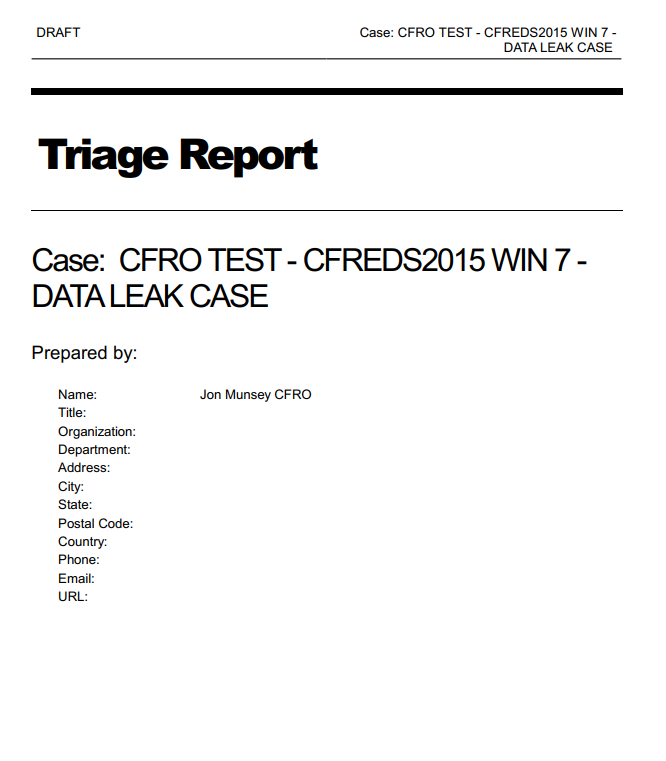
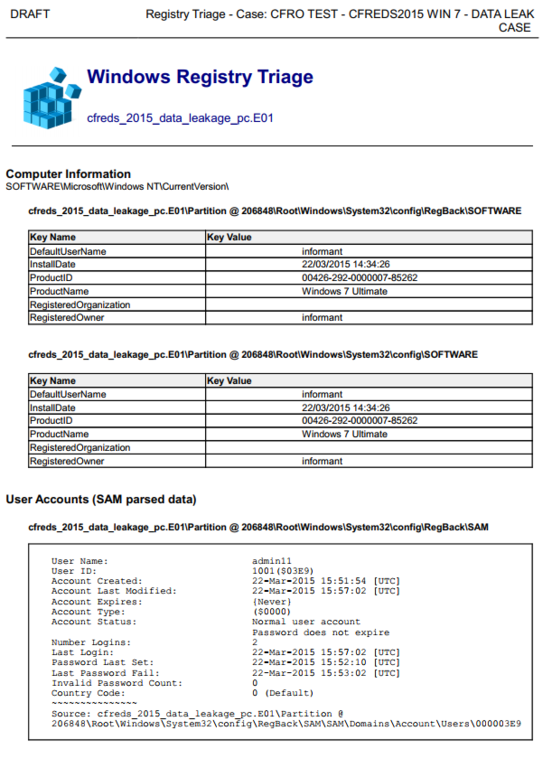

I really like this, its fast to produce and contains just enough detail - you can customise the report within FE, pagination, titles etc.
I note that FE shows information from the backup registry files first - which is a bit odd - but the active registry data does follow on. I've asked them to make this more intuitive and reverse the current order.
I also saw more of what I consider to be one of FE's biggest enemies, lack of consistency. Looking through the report data we see really useful notes after timestamps, stating whether they are UTC or Local Time - a real time saver on cases when counsel/clients are asking exactly when an event took place.
Yet in other parts of the report this information is missing. A bit more uniformity here would save us all a lot of time when we are asked to elaborate on a time in a report where this information is missing.
Reporting Section Summary: Excellent - Quick, easy to use and configurable.
 Typical FE Log File
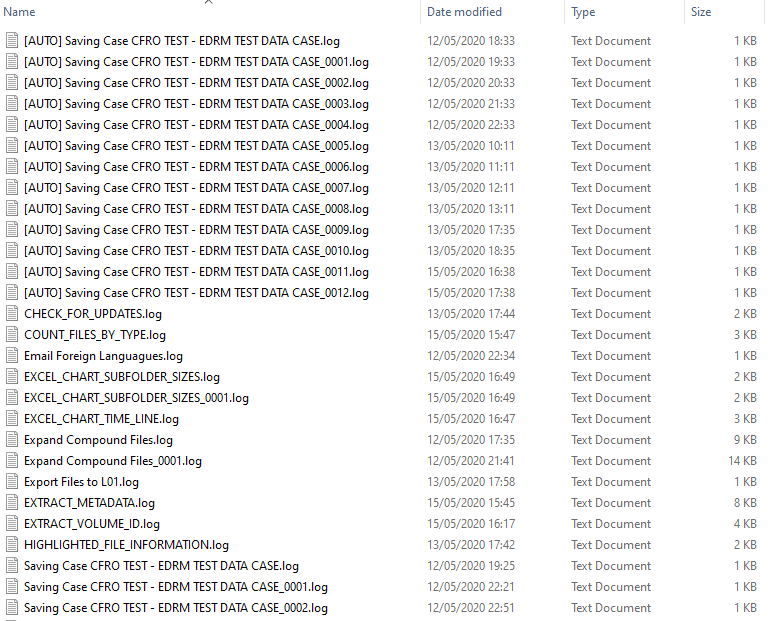 Log folder contents
A nice feature would be a button that opens this folder for your current case, right in FE - how about it GD ?
28. Further Features:
I like to think I give a product a good going over when I review it, but with FE's case, its a bit like the map on GTA5 - sprawling.
Sadly there is no way on earth I can possibly use all of these features (let alone test them!!) - the list is almost endless!
Below are another two menus hidden away in FE, both packed full of scripts that can parse data to show artefacts or carry out some other operation, these are nestled in the File System tab;
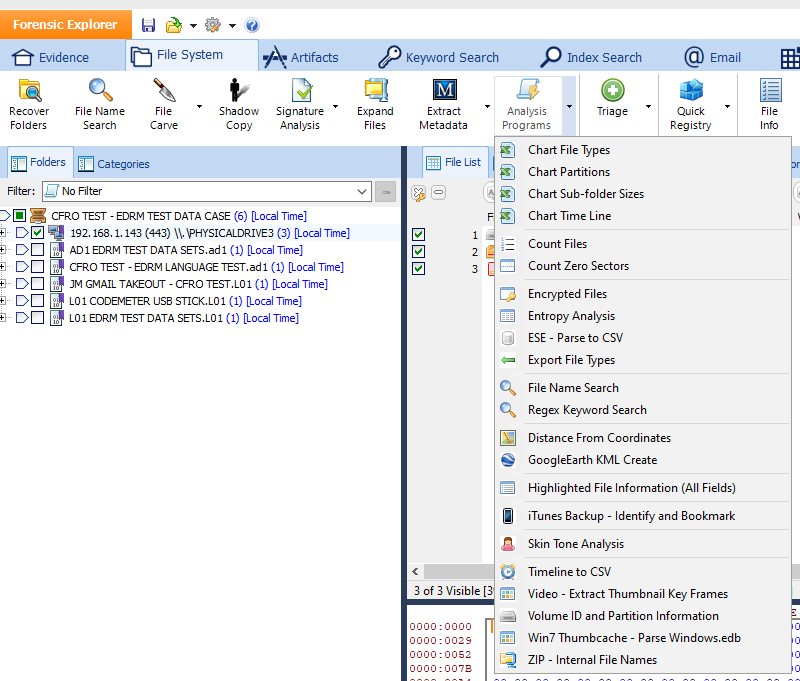 Analysis Programs Menu
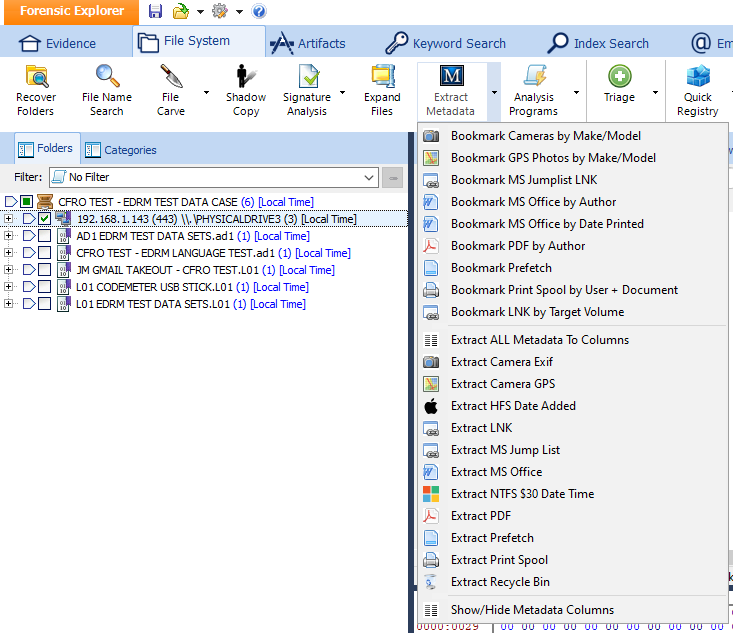 Metadata Menu
Bugs:
Hmmmm, how many of you skipped the whole of the review and came here first ?
This is always a tough section to write, all so called "forensic" software has bugs (I know, I spend hours each month finding them).
All vendors have them - and as we know, some are better at dealing with them than others.
Bugs Come in Two Kinds - Major and Minor:
There are two types of bugs in my eyes, those that I don't give a rats a*se about and those that could have an effect on an investigation by telling the investigator incorrect information. So I call those Minor and Major bugs respectively.
Core Code is Good:
What I would call the "Core" code - for the most part - seems to work fine, thats the stuff that has been baked into the product from day one, what I call mature code.
Pascal Data Parsing Scripts:
Periphery things, such as all of the data parsing scripts that can be run on data that you have ingested into FE is where I experienced some many
problems.
Putting on my programmer hat, what we have here is a whole stack of bolt on features that each requires a lot of work to keep up to date. Its a massive undertaking - I wouldn't want to program and maintain this code for all the tea in China.
If that work stops, or a script is left untouched even for a few months, it is going to either stop working or produce incorrect results if the data it is designed to handle changes. This is true of all forensic tools that parse data where file formats periodically change - for example, Whats App chat databases.
Its hard to say exactly how many features have issues, what I can say is that I have not done a full on deep dive into testing every nut, bolt and washer - yet I immediately found things that did not work as intended.
In your humble reviewers opinion, these would catch out investigators who are used to accepting what their tool displays on the screen is correct.
This especially applies to our newer investigators and apprentices - who may be believe what they see on the screen, whereas the more seasoned investigator would have the experience to say to themselves "hang on...that doesn't look right".
Why So Many Issues ?
Pretty simple really - GD have made a rod for their own back, meaning they have developed an incredibly complex piece of software which they are struggling to maintain.
So without further ado, lets have a look at some of the bugs I found during my *very* limited informal, unstructured "organic" testing. All issues listed here relating to parsing errors were tested in two other forensic tools, to ensure that the issue was with FE and not with the test data itself.
Minor Bugs:
1. Under certain conditions, FE ceased displaying the Sender or Display Name of E-Mail messages in the E-Mail module during navigation.
2. When attempting to process file signatures within an APFS image created with Macquisition (which FE lists as a supported format) FE was unable to complete the task and reported "Exception Caught" in the error log.
3. When testing parsing functionality of Unicode and ANSI encoded Outlook .PST and .OST E-Mail files, FE was unable to display the name of the Calendar folder within the IPM Subtree structure.
4. It was observed that during timeline testing, inconsistent date formats were used in certain columns, making sorting difficult (especially for end clients) without modifying the format of those cells manually.
5. During further E-Mail module testing, it was observed that intermittently FE would shrink the "Subject' column down to a minimal size, essentially hiding its content from the examiner until its size was manually re-adjusted.
6. During Timeline testing, it was observed that it was possible to set an end date for the timeline that was prior to the start date. FE blindly carried out the relevant processing for this request, only to respond at the end of the process "no records in that period".
7. During the testing of the File System tab, it was observed that FE was unable to view .POTX (Powerpoint template files). It was not tested to determine whether Word .DOTX or Excel .XLTX files could be viewed.
8. When testing the Artefact Tab script "Email Client", this script would not run, reporting the error "The script did not receive a vaild registry key to process". This was on a Windows 10 machine with Microsoft Outlook and Windows Mail installed. Other scripts (Triage) in FE were able to detect the installed E-Mail clients.
9. During further testing of the Artefacts Tab, specifically parsing Chrome browser data, it was found that FE was displaying certain fields within the database which contained the value "0" as the date 01-01-1601, meaning entries that did not have a date recorded were displayed onscreen, in file exports and reports as taking place on the aforementioned implausible date. It is understood programatically why this date appears within FE, but none the less, this is forensically incorrect.
10. During further testing of the Artefacts Tab, it was observed that when viewing parsed index.dat files from Internet Explorer 9, the URL column would intermittently stop displaying the visited URL during navigation of the GUI. Closing FE and restarting it would temporarily cure the issue until the contents of the colmun became blank again.
Major Bugs :
1. During Outlook E-Mail testing, FE was observed to be mixing up E-Mail bodies - meaning that when one message was clicked on for viewing purposes, the examiner was shown the body text of another (completely unrelated) message.
2. During .Mbox E-Mail testing of Google Takeout downloads, FE was observed to be showing messages as "Unread" and flagged as "Important," when in fact they were flagged as neither.
3. During testing of the Evidence tab, specifically when opening a case when an evidence item is no longer accessible (for example a remote machine that was connected to using the Remote Investigation tool), FE was observed to be mixing up the names of evidence files, which meant that onscreen, in excel exports and reports a files location/path was incorrectly listed as being present in evidence file "A", when it in fact resided in evidence file "B".
4. During Chrome cache parsing tests, FE was found to be ignoring certain files that contain cache entries, which ultimately resulted in many entries being missed and not shown to the examiner.
5. During general testing a build of FE was released which once installed, caused the program to no longer run on the test machine (Access violation errors). Uninstallation of FE and various attempts to manually clear the registry of data failed to fix the issue. A new version of FE was released shortly after which cured the problem.
6. During Internet Explorer history parsing of legacy index.dat files, FE was found to be incorrectly reporting both the quantity of records available and their category. Cache and Cookie entries were reported to the examiner as being part of Main history, when in fact they reside in completely separate database files within the disks file system.
7. During another Internet Explorer history parsing test - of legacy index.dat files, FE was found to report there were 0 entries in the "Main" history database, missing thousands of history records contained within the test data.
8. During testing of FE Imager 2.0, it was observed that logical image (.L01) files created with the tool caused EnCase 8.11 to report an error "Cannot read integer" when those files were opened. This same error occured when converting .AD1 logical evidence files to .L01 files and attempting to open those in the same version of EnCase.
9. During further .Mbox parsing tests, FE was observed to be showing a blank "Sent" date/time column and populating the "Received" column with a date and time, when in fact the message was a "Sent" E-Mail.
10. During timeline testing, FE was observed to be informing the investigator incorrect information in relation to .Mbox E-Mail messages, in brief it was stating that events took place in 1899, reported incorrect file extensions for items and declared that E-Mails were "Received" when they were in fact sent.
11. During the testing of Registry Artefact parsing, FE was incorrectly stating that networks the computer had connected to were Wireless.
12. During the testing of Apple Mac Artefact parsing (10.8, 10.13, 10.14 and 10.15), FE was observed to be missing rudimentary artefacts and not displaying them to the examiner (when they were present in the test disk image) - examples include but are not limited to; iTunes account names, time zone settings and the presence of E-Mail clients.
13. During further testing of the E-Mail module, during Outlook .PST examinations, FE was found to be injecting iterations of "00122131 MESSAGE" into the subject line of messages that in fact had a blank subject.
14. During testing of the Microsoft Office MRU script (to list recently opened documents) it was found that FE was only displaying entries that related to files being opened with Excel. Entries that were actually present for Word and Powerpoint were not displayed to the examiner.
15. During further testing of the E-Mail module, in relation to viewing messages in the "Drafts" folder of an Outlook .OST file, intermittently FE was observed to be displaying certain messages that had a fully populated message body - as blank to the examiner.
16. During testing of the Artefacts Tab, specifically parsing iTunes backup files for WhatsApp chat, FE missed all WhatsApp chat database files and reported that no messages were present.
All Issues Reported to GD:
I reported all of the bugs, issues and QOL suggestions to GD in advance of this review being published.
Some of them were worked on very quickly and fixed almost instantly, the remainder are being worked on by GD as a matter of urgency and will all be fixed in upcoming releases of FE. It is most likely that all of these issue will be fixed by the time you read this review - and as with all CFRO reviews, if I get a list of what was done about each of these issues, I will update the review with those fixes.
GD have acted properly and professionally in light of the issues found, I would like to thank them for their cooperation during the review process.
Bugs Section Summary - POOR- Urgent work required in mulitiple areas.
Stability:
I was not expecting this but FE is very stable and well behaved.
The only lock up of the application the entire time through the review process, was when I tried to cancel ingestion of an image file, where I had selected multiple things to be parsed at the same time (file sigs, compound files, etc...) and then clicked the cancel button - an "End Task" via Task Manager was the only way out of this one.
So throughout the indexing, E-Mail examination, unallocated space carving -whatever I threw at FE, it chomped it up and completed without crashing!
No crashes to the desktop (as we see in Encase), no dissapearing GUI (as we see in FTK 7.1) and no weird processing errors (as we see in IEF).
An AutoSave That Actually Works:
FE has an "AutoSave" function that actually works (unlike the ludicrous "I'm going to take 3 hours and backup your evidence files" feature found in Encase) - meaning each hour it writes a copy of the case file (sans evidence files thankfully) and offers functionality similar to Microsoft Office's AutoRecover when you reopen FE after a crash or hung application scenario.
I've not dug into how well this actually works, but for me, it worked like a champ.
Remember, because FE does such concise logging, you can actually see what got done before the crash occured, so no need to repeat things (such as file sigs or indexing as examples) "just in case" they did not finish before the application crashed.
Don't Lose Your Backups if you Uninstall:
One thing to be careful of, is that FE, by default puts anything you choose to backup into the C:\Program Files\Forensic Explorer folder, which gets toasted (with no warning) when you uninstall. But you know this as you read all about the backup path in the manual...right :)
Most Stable Forensic Tool Ever ?
Is this the most stable forensic tool I have ever used (well, other than Arman's E-Mail extractor) yes it is.
I have not seen this level of stability for a long long time, so hat off to GD here, I would have not problem queing up a load of evidence and leaving it to run unattended over a weekend.
Stability Section Score - EXCELLENT - Never seen anything like it, amazing!
This is the sign of a vendor with integrity - as opposed to others who let the suits in the PR department vet a bug fix list before it is published - because if it ever became public that something serious didn't work as intended that could hurt the bottom line or tarnish the company's reputation.

Once submitted you get a confirmation E-Mail so you can get on with the rest of your day knowing that this has been received.
At the time of writing we are experiencing the Corona virus pandemic, so I am expecting a slow response so my experience won't reflect how things would go in the real world.
UPDATE: Almost an instant response, so no problems there!
Support & Warranty Section Summary - EXCELLENT
Where to start on this one, well lets get this out of the way first:
As you have probably worked out from this massive wall of flourescent text called a review - FE is not a "one click extract everything tool", there is no find evidence button.
 There is no find evidence button
FE is what I would described as a very high quality set of knives that were very expensive - sadly some of those knives are a now bit blunt that they can't cut the meat any more.
In the right hands FE's toolset can slice open the file system and its files to reveal the deepest metadata. FE reminds me of X-Ways.
FE has been written by a seasoned forensic examiner (with the support of other programmers) and that is probably why, issues aside, I like it.
Lets go back to my earlier comment - "this is not a one click extract everything tool".
Whilst FE has a great high level triage function, it lacks the depth that other products offer - to allow an officer or investigator to get to what they want (chat, pictures, email etc..) as fast as possible.
Don't get me wrong it does have these capabilites, but you have to work to get to that data out.
Workflow Driven:
So you have probably also worked out that FE demands that you are a disciplined investigator, with a workflow, which if implemented religiously on each disk image can truly lever FE's features.
If you start to use FE without a strict workflow, you will become quickly frustrated that nothing has been done for you in advance and you have to click seventeen-thousand menu items individually to get data out that in most tools is a one or two click fire-and-forget operation.
So, for drugs related cases, you would set up a workflow that parsed chat, emails and other related items. For cases involving indecent images, you would be parsing photos, exif data and location data. Fraud cases you would be indexing all of the documents and email on the machine etc..etc...
Weak "a-la-cart" Processing of Evidence
I think all products (even the similarly hardcore ones) are moving towards the "a-la-carte" menu of processing option when you add an image to a case - for me this is a "must-have" feature as it saves so much time, a few clicks and then come back hours later to investigate the areas you chose.
Let me be very clear - I'm not saying I want a toothless version of FE that works like Magnets Internet Evidence Finder, I love the teeth of FE - I just want additional automation of what the product is already capable of.
Access Data's Forensic Tool Kit (as one example) it gives you a nice dialogue so you can queue stuff with a few clicks and then get on with something else (like prey at church on Sunday that it won't crash to the desktop with no error or enter an infinite "processing loop") in the meantime!
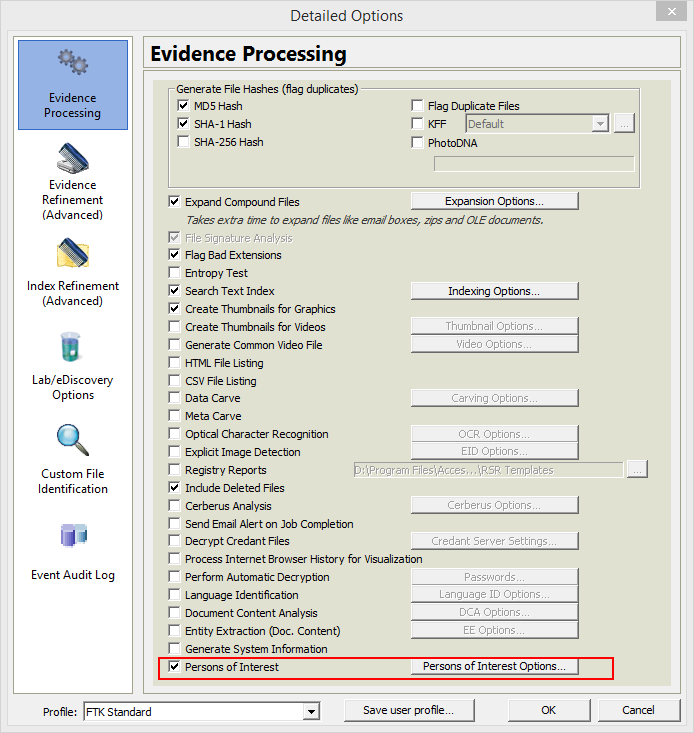 FTK - Evidence Processing Wizard
As you can see here, IEF (albeit defunct now and replaced with the extortionately expensive Axioum) also employes the comprehensive a-la-carte menu system;
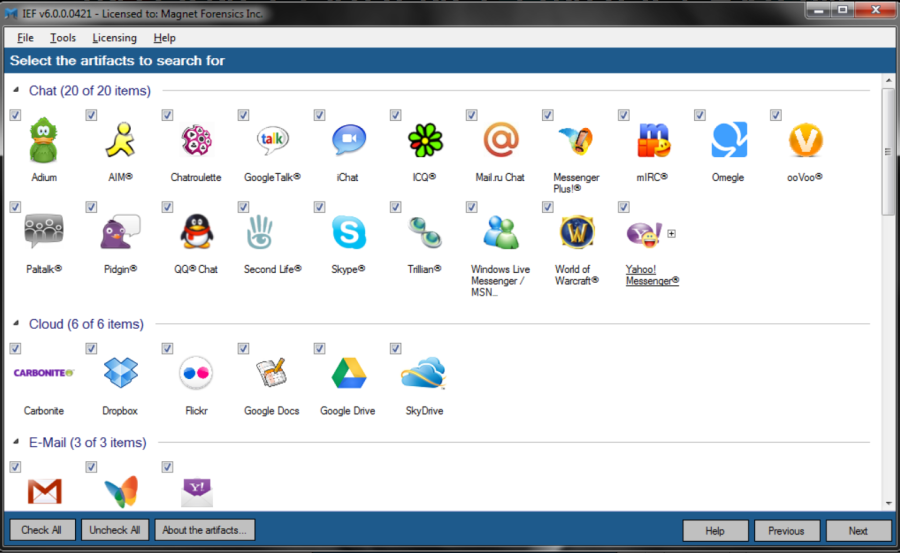 IEF Evidence Processing Wizard
I would strongly recommend GD to add in something like this to FE's front end - as the capability is already there in the form of the "Evidence Processor dialogue box", its just the presentation which makes FE seem somewhat inaccessible to new users who are used to the a-la-carte service offered by most contemporary forensic software.
FE has moved in the right direction with its "Triage" function, so lets hope that work continues to expand automation.
Take a look at that Evidence Processor dialogue (below), whilst it looks great at first glance - you can't really do anything other than basic tasks. There is no option to automatically parse out all chat, internet history, E-Mail or even index the disk at image ingestion time - to me these are serious omissions and rather strange design choices (as parsing of these data types is already built in).
 FE's Weak Evidence Processor Dialogue
You have to run separate scripts (one for chat, one for browser history, another for registry data, etc...etc..). Its all a bit fiddly and way to time consuming for examiners that are under pressure to get as much done in a day as possible.
I think this would be a major improvement and this then puts FE truly up there with the big boys when it comes to automated processing - yet retaining the power to dig deep if required.
So thats it, onward to the scores section:
Scoring & Awards:
Taking your feedback onboard, the scoring section has now been expanded to give you more detail on how individual features of a product performed. You can now see at a glance what is good and what needs work, without having to trawl through the whole review each time;
| Review Section: | Sub-Section: | Sub-Section Rating: | Overall Ratings: |
| Training & Other Resources | - | - | EXCELLENT |
| Purchasing Process | - | - | EXCELLENT |
| Download & Unboxing | - | - | EXCELLENT |
| Installation & Uninstallation | - | - | EXCELLENT |
| Ease of Use | - | - | GOOD |
| Features: | - | - | GOOD |
| Disk Image Support (Win/Mac) | Excellent | - | |
| File System Handling | Excellent | - | |
| Disk Imaging Tool | Very Good | - | |
| Disk Image Conversion | Excellent | - | |
| Triage Module | Excellent | - | |
| E-Mail Module | Excellent | - | |
| Apple MacOS Artefact | Average | - | |
| Windows Program Artefacts | Average | - | |
| Windows Registry Artefacts | Average | - | |
| Disk Image Virtualisation (Liveboot) | Excellent | - | |
| Autosave | Excellent | - | |
| Virus Scanner | Below Average | - | |
| Indexing Module | Very Good | - | |
| Time Line | Average | - | |
| Log Files | Excellent | - | |
| Remote Analysis | Excellent | - | |
| Reporting Module | Excellent | - | |
| Bugs | VERY GOOD | ||
| Stability | EXCELLENT | ||
| Updates & Bug Fixes | - | EXCELLENT | |
| Value for Money | EXCELLENT | ||
| Licencing Fairness | VERY GOOD | ||
| Documentation | GOOD | ||
| Support & Warranty | EXCELLENT |
Overall Score = 9.0 out of 10 (V5.4.2.1238)
Old original score was 7/10
Special Awards:
Product Awards [Updated 11/2/21]:
You may recall that in the original review, waaaay back in 2020 that Forensic Explorer didn't get any awards, due to scoring a rather "meh" 7/10 bug that their testers missed cost them the award.
I've been back to FEX this week and had a look at the main niggles I had with it, and can confirm that the bugs have been fixed. Whats more an *insane* amount of extra features have been added (Exchange EDB support and Windows 10 Timeline to name two big hitters).
This means that FEX has received a well justified bump to their review score (coming out with 9.0 out of 10) which is the magic number to receive a CFRO Sizzler award - given to products that are well above average and have survived the CFRO meat grinder.
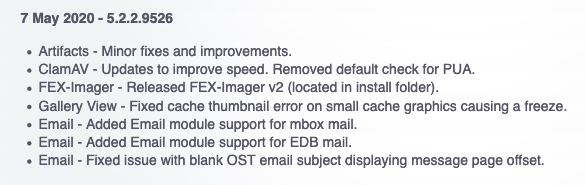
I suggest you check out the changelog here to see all the bug fixes and the new features added (still can't believe they do all this for the price!).
 Snippet from FEX changelog
Well done Graham for stepping up and taking on board you had some hidden issues, it was a pleasure dealing with you guys and if I didn't already have 19 million forensic tools, I would certainly be parting with some money to buy this.
Not wanting to waffle on, but I still can't believe how many killer features are in this product for the price.
Vendors Awards:
Vendors themselves (as a company) can also receive a reward, in the form of the "Super Vendor" award, which is given to vendors who take criticism well and go above and beyond to fix, repair and change things that CFRO found to be broken in their products.

GetData are awarded CFRO's coveted Super Vendor award! Once more I have experienced passionate people running a small company - who are not afraid to take on-board constructive criticism and quality of life suggestions. Graham at GD was especially courteous and attentive during our many E-Mail exchanges during the long review process of FE. In essence, you can be sure that you will receive amazing support if you do decide to purchase FE.
Summing Up:
"A hardcore forensics package designed for hardcore investigators, bristling with premium features and for a very low price tag."
"Disk image and file system support for Apple devices is stellar, however, Apple artefact parsing capabilities - although present - are very weak and in need of a well overdue overhaul - along with their Windows counterparts."
"The indexing engine is a killer feature for FE, providing you are aware of its limitations and alter your workflow to suit - there is no reason not to use this as your sole keyword searching tool."
"With a little more automation of existing capabilities, FE could be made to appeal to the beginner and also steal the myriad of users who still use EnCase to cull and package their files before ingestion into E-Discovery platforms - thats a lucrative opportunity not to be missed."
"FE had a significant number of issues that showed incorrect or inaccurate information to the
examiner. Although fixed (or in the process of being fixed by the time you are reading this), they caused the hair on the back of my neck to stand up when discovered - especially in a product
this mature. These issues dragged my product rating down from an award winning 9 out of 10 to a dissapointing 7." Fixed in recent updates.
"Regression and dependancy testing across the entire codebase of FE appears to be non-existent.
This needs urgent attention by FE's development team - to ensure issues don't creep in when new functionality is added or older code, with deeply buried dependancies is
modified." Fixed in recent updates.
"As with many other vendors looking to the short-term, GD have the expired SMS disease, essentially extorting monies from and unfairly penalising returning customers who decided to take a break from FE. When are the bean-counters in this industry going to learn that this is not how to obtain reoccuring revenue from previous customers."
"FE is something that is clearly a labour of love, made by passionate people for passionate people. If you are thinking of moving away from EnCase as your E-Discovery culling tool, or FTK as your indexing tool - this is a viable alternative at a fraction of the price. With really low renewal costs, along with so many premium features, FE becomes a very very attractive product".
QuickQuiz Terms: All entries must be received before the 4th of January 2019 to be entered into the draw, entries received after that date, sadly, won't be eligible for entry. One entry per organisation. I can't believe you are reading this, well done for being a thorough investigator.
 Print
Print